
Workout guides Rep pacing
How to Pace Your Reps: One Rep Every 5, 10 or 15 Seconds
“One rep every 10 seconds” means starting a repetition at 0:00, 0:10, 0:20 and so on. Complete the movement, then use the remaining time to reset. That is 6 reps per minute. A rep pace timer gives each start cue while keeping the full workout on one schedule.
One rep every X seconds means start to start
With one rep every ten seconds, the first repetition begins when the work clock starts. The next begins ten seconds later. Complete each movement with control and use the time left before the next cue to reset.
This interval includes the movement itself. If a rep and reset take four seconds, a ten-second interval leaves six seconds before the next start. Resting ten seconds after finishing would create a fourteen-second interval instead.
One rep every 5, 10 or 15 seconds
Reps per minute = 60 ÷ seconds per rep. For a planned work block, divide its duration in seconds by that same interval to calculate the target number of full rep intervals.
| Rep interval | RPM | Reps / 5 min |
|---|---|---|
| 5 seconds | 12 RPM | 60 |
| 10 seconds | 6 RPM | 30 |
| 15 seconds | 4 RPM | 20 |
Calculate your own seconds-per-rep schedule and target reps for a chosen duration.
Choose an interval that accommodates the movement, reset and intended recovery at your planned load. These values illustrate the calculation rather than prescribe a lifting rate.
The reverse calculation is target reps × seconds per rep = allocated work time. Twenty reps at fifteen seconds each and thirty reps at ten seconds each both create a five-minute block, with different rates and rep targets.
Example: 30 power cleans, one every 10 seconds
30 timed singles
Movement: Power clean. Pace: 10 seconds per rep. Target: 30 reps. Work block: 5:00.
- Start rep 1 at 0:00, rep 2 at 0:10 and rep 3 at 0:20.
- Complete each rep and reset before the next cue. Follow your session’s instructions for returning the bar and preparing the next lift.
- Start rep 30 at 4:50. The last ten-second interval ends at 5:00.
- 0:00Rep 1
- 0:10Rep 2
- 0:20Rep 3
- …
- 4:50Rep 30
- 5:00End
The first cue starts rep 1. The final signal ends rep 30’s interval; it does not start another repetition.
Set up 30 reps at 10 seconds per rep in Aika.
A five-minute allocation also differs from an actual finishing time. If your last clean finishes at 4:53, that is when the work is complete; the pace timer still reserves the final interval through 5:00. For a workout scored by finishing time, follow its scoring instructions and use an elapsed clock.
Rep Pace vs EMOM vs For Time
| Format | What controls the start? | Example |
|---|---|---|
| Rep Pace | A regular cue for each target rep | One clean every 10 seconds |
| EMOM | A new set starts every minute | Six cleans at each minute’s start |
| For Time | You manage starts on a continuous clock | Complete 30 cleans and record finishing time |
One rep every ten seconds and six reps at the beginning of each minute both plan six reps per minute. They distribute those reps differently: regular singles spread the work through the minute, while the EMOM can group the reps and leave a longer break afterward.
Timed singles can make a planned rate easier to follow, but they are one option within a workout’s pacing strategy. An observational pilot study of 11 CrossFit Open competitors found relationships between pacing and performance; it did not establish one ideal seconds-per-rep setting.
Source: Mangine et al.: Workout Pacing Predictors of CrossFit Open Performance (pilot study).
Read how EMOM works, how to set an EMOM timer or what For Time means if the prescription uses one of those formats. Rep spacing also differs from tempo within a repetition.
Set a seconds-per-rep timer in Aika
For the clean example, open Rep Pace, choose the Reps goal and set it to 30. Tap Pace, select Sec/rep, choose 10 and confirm. The calculated work time should be 5:00. Review preparation time separately, then start.
The large countdown follows the next target rep. The smaller values show scheduled rep progress and total remaining time. This capture uses the same 30-rep, ten-second setup as the example.
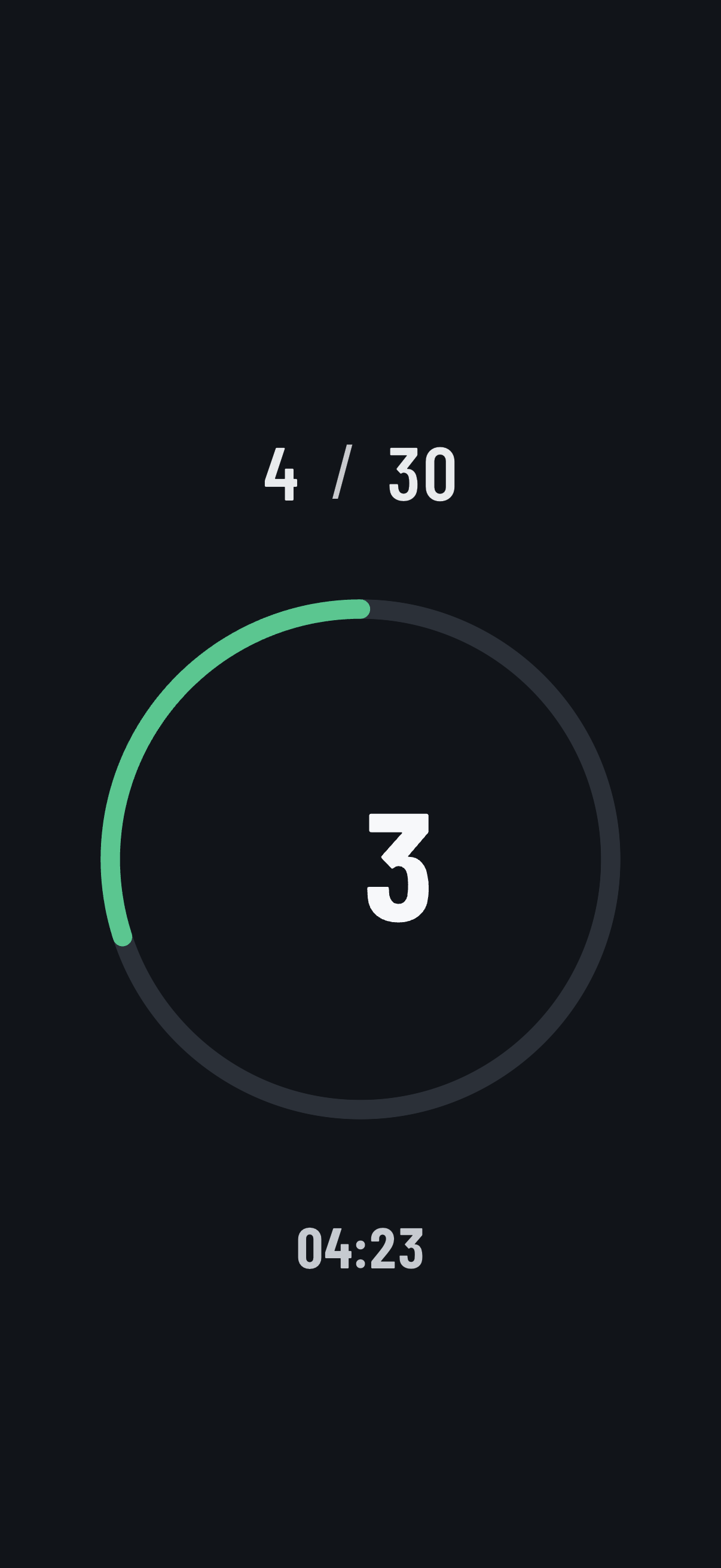
Aika cues starts without detecting completed reps. Try a few cues before training to check the sound and optional vibration. For the controls and goal modes, see how to use Rep Pace. For rates written in repetitions per minute, use the kettlebell RPM conversion table.
Common questions
Does one rep every 10 seconds mean 10 seconds of rest?
No. The ten seconds run from the start of one repetition to the start of the next. If the movement and reset take four seconds, six seconds remain before the next cue. Ten seconds of rest after finishing each rep would produce a longer, variable start interval.
How do I calculate the duration for a target number of reps?
Multiply target reps by seconds per rep to allocate one full interval to every rep. For 30 reps at 10 seconds each, that is 300 seconds, or 5:00. The first start is at 0:00 and the thirtieth is at 4:50; the final interval ends at 5:00.
Can this timer pace CrossFit workouts?
It can cue evenly spaced single reps when that matches your workout plan. It does not choose a WOD strategy or replace a For Time finishing clock. If the workout requires several movements, changing rates or sets of multiple reps, follow that prescription and choose the timer accordingly.
What if I miss a rep cue?
The schedule continues; the timer does not know whether you lifted. Do not rush an extra rep to make its target count match your actual count. Pause or stop if you need to reset, and adjust the load, interval or rep target before another attempt.